
Wizards
Experimental
Wizards are experimental. The DSL and behavior may change in a future release.
Build multi-step flows (onboarding, checkout, "create several related records across screens", branching questionnaires) as a single declarative Ruby class.
A wizard collects typed data across ordered steps, optionally branches with condition:, and commits at the end via execute. It reuses Plutonium's existing field DSL (attribute/input/validates/structured_input/form_layout), form rendering, actions, and policies, it does not invent a parallel stack.
Goal
The user lands on the first step, fills it in, clicks Next, and walks through the flow. Branching steps appear or disappear based on earlier answers. A built-in review step recaps everything and gates a Finish button. On finish, execute writes the records, atomically by default.
Prerequisites: enable the subsystem
Wizards are core code, but the storage table is opt-in so apps that don't use wizards stay schema-clean. Enable it in your Plutonium initializer:
# config/initializers/plutonium.rb
Plutonium.configure do |config|
  config.wizards.enabled = true            # false by default; registers the gem migration
  config.wizards.cleanup_after = 14.days   # global default idle TTL for the sweep
end
Then run the migration (it ships in the gem and runs in place, no copy step):
rails db:migrateThis creates the single framework table plutonium_wizard_sessions. See Storage & config for the details.
Schedule the SweepJob for save-as-you-go wizards
For plain execute-only wizards, leaving the sweep unscheduled only leaves stale session rows (harmless). But if you use per-step on_submit (which creates real records mid-flow), Plutonium::Wizard::SweepJob is the only thing that cleans up abandoned partial records. Schedule it as a recurring job. See Storage & config.
A minimal wizard
The common case writes nothing until the end. Steps collect data; one execute does all the writes in a single transaction.
# app/wizards/company_onboarding_wizard.rb
class CompanyOnboardingWizard < Plutonium::Wizard::Base
  presents label: "Onboard a company", icon: Phlex::TablerIcons::BuildingSkyscraper

  step :company, label: "Company details" do
    attribute :name, :string
    attribute :subdomain, :string
    input :name
    input :subdomain
    validates :name, :subdomain, presence: true
  end

  step :plan, label: "Plan" do
    attribute :plan, :string
    input :plan, as: :radio_buttons, choices: %w[free pro]
    validates :plan, presence: true
  end

  review label: "Review & submit"

  def execute
    company = Company.create!(name: data.company.name, subdomain: data.company.subdomain, plan: data.plan.plan)
    succeed(company).with_message("You're all set!")
  end
end- A wizard is a plain class,
< Plutonium::Wizard::Base. There is no generator (just like interactions); author it by hand. presents label:/icon:sets the launch button's label and icon, exactly like interactions; an optionaldescription:renders as the wizard's header subheading.- Each
step :key, label: do ... endis one screen. Inside the block, declare its fields with the same DSL you use on a definition or interaction. datais step-keyed:data.company.namereads the typed value entered on the:companystep (cast to the declared type), available from any step and fromexecute. Each step has its own sub-object, so two steps may use the same field name without colliding.reviewis a built-in terminal step (auto-summary + gated Finish). It must be last.executeruns once at the end and returns anOutcome(succeed(...)/failed(...)). Use bang methods (create!/update!); failure is signalled by a raised exception, never a return value.
Use bang methods in execute
The engine detects failure by a raised exception. Non-bang create/save/update return false on failure without raising; the engine can't see that, treats the step as successful, and advances, silently losing the data. Always use create!/update!/save!, or call fail!("message").
execute is a presentation boundary, same as an interaction's
A wizard is built with view_context: too, so everything reachable only through execute is reachable only from a wizard run. Steps and execute own the flow: which screens, in what order, writing what. What the write means belongs on the model as soon as a second caller wants it: the API signup that skips onboarding, the admin backfill, the importer. Company.create!(...) inline is fine for a one-off; Company.onboard!(...) is what you reach for when it isn't. See Interactions › What an interaction is for, the rule is identical.
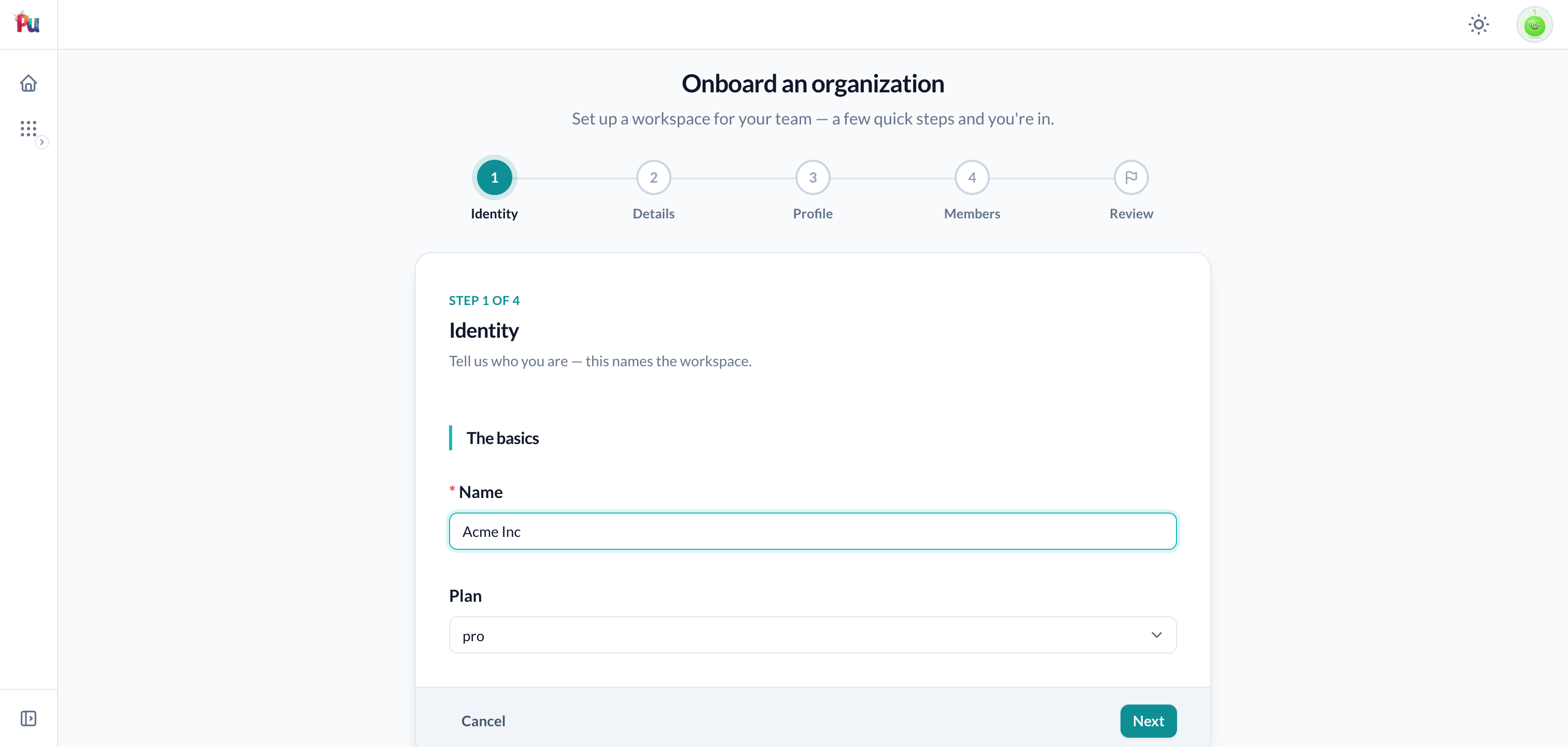
Each step renders as a focused card with a numbered stepper rail (the terminal review shows a finish flag, not a number) and a Back / Next / Cancel strip:
Branching with condition:
A step's condition: lambda decides whether the step is included. Branching is subtractive: a falsy condition: removes the step from the visible path.
step :plan, label: "Plan" do
  attribute :plan, :string
  input :plan, as: :radio_buttons, choices: %w[free pro]
  validates :plan, presence: true
end

# Only shown when the user picked "pro".
step :billing, label: "Billing", condition: -> { data.plan.plan == "pro" } do
  attribute :card_token, :string
  input :card_token
  validates :card_token, presence: true
end
condition: lambdas must be nil-safe
A condition: runs against the typed data snapshot at every transition, including before its deciding step has been filled, when the value is still nil. -> { data.plan.plan == "pro" } is fine (nil == "pro" is false); -> { data.plan.plan.upcase == "PRO" } raises on nil. Always write conditions that tolerate nil.
The condition can also read anchor (for anchored wizards). Data belonging to branch-hidden steps is pruned before execute, so execute only ever sees data for steps that actually applied.
Reusing a model's fields: using:
Instead of re-declaring fields a model already defines, import them with using:. It is a step option (not a block method), and it targets a model (record class) only.
# Whole-step import, no block needed.
step :branding, label: "Branding", using: Company, fields: %i[logo brand_color]

# Mix imported + wizard-local fields: using: plus a block for the extras.
step :details, label: "Details", using: Company, only: %i[tagline] do
  attribute :referral_code, :string
  input :referral_code
end
What using: imports from the model:
- Field universe + types from
Model.attribute_names/Model.attribute_types. Selectorsfields:(aliasonly:) andexcept:pick a subset. - Input styling overlaid from the auto-resolved
<Model>Definition(itsas:, options, labels), best-effort; no definition found is fine. - Validations run via a transient
Model.new(slice).valid?, keeping errors on the imported fields plus:base. Passvalidate: falseto skip and write your own inlinevalidates. form_layoutinherited from the<Model>Definition(filtered to imported fields). Passlayout: falseto opt out.
using: is declaration reuse only: it never pulls in the model's persistence or callbacks. Data still stages into data; your execute does the writes. Full detail: DSL reference › using:.
Sectioning a step: form_layout
A step is its own form, so you can group its fields with the same form_layout DSL you use on a definition, scoped to that step:
step :company, label: "Company details" do
  attribute :name, :string
  attribute :subdomain, :string
  input :name
  input :subdomain
  validates :name, :subdomain, presence: true

  form_layout do
    section :identity, :name, :subdomain, label: "Identity", columns: 2
  end
end
Repeatable / structured fields
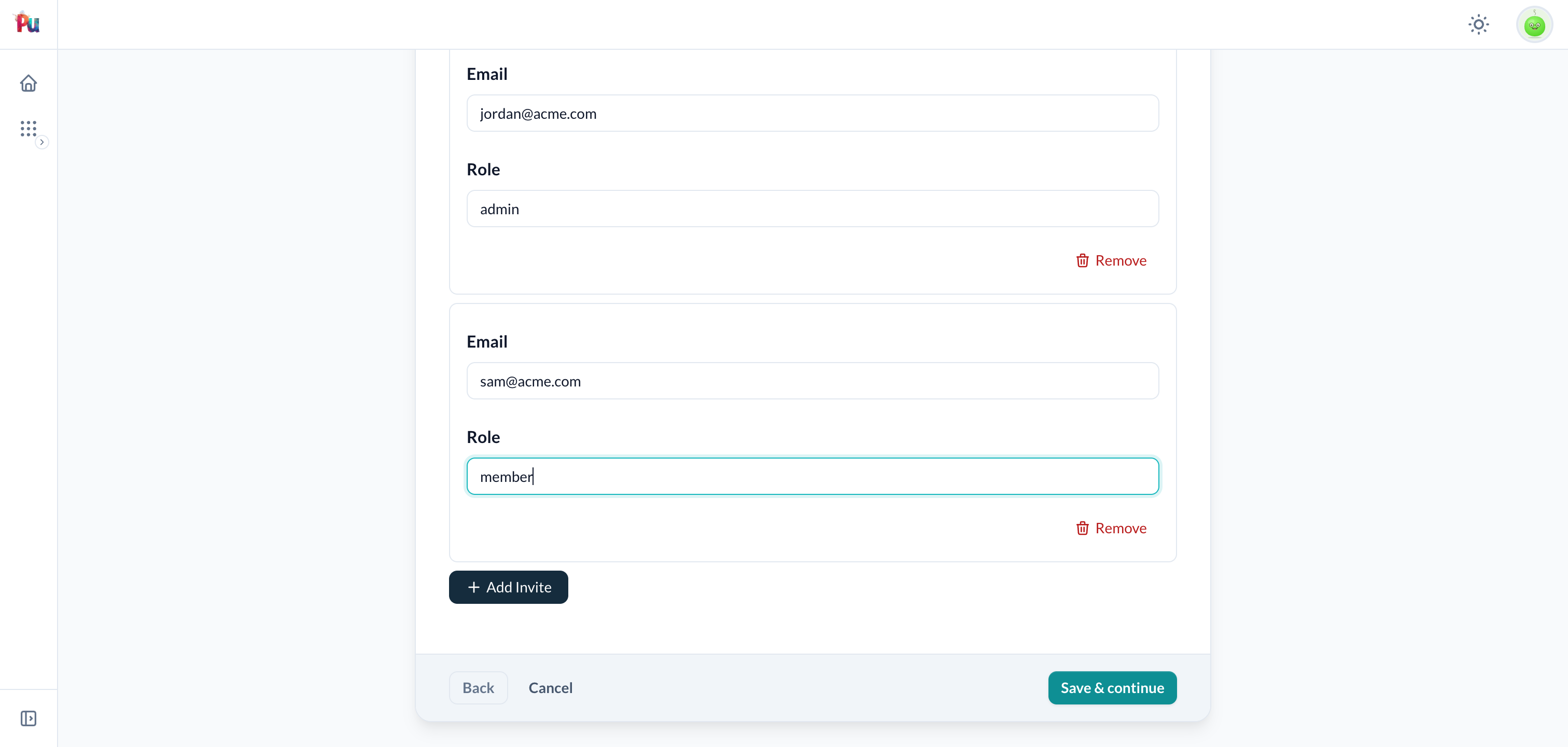
Because a step uses the existing form pipeline, structured_input works inside a step. The values land in data.<step>.<name> as an array of typed sub-objects:
step :team, label: "Invite your team" do
  structured_input :invites, repeat: 5 do |f|
    f.input :email, as: :email
    f.input :role, as: :select, choices: %w[admin member]
  end
end

def execute
  company = Company.create!(name: data.company.name)
  data.team.invites.each { |i| company.invites.create!(email: i.email, role: i.role) }
  succeed(company)
end
Repeater rows rehydrate from staged data on GET, so navigating back (or resuming) re-renders the rows you already filled.
File uploads (attachments)
A step can collect a file. You declare it like any other field: a :string attribute (it holds the upload token, not the bytes) plus a file input:
step :photo, label: "Photo" do
  attribute :photo, :string
  input :photo, as: :file        # also: as: :uppy / as: :attachment
end
A wizard stages its data as JSON across several requests, so a file can't ride along, only a token does. The field stages the backend's upload token (an ActiveStorage signed_id, or active_shrine/Shrine cached-file data); your execute assigns that token to the model's attachment, which both backends accept natively:
def execute
  member = Member.create!(name: data.profile.name)
  member.photo.attach(data.photo.photo) if data.photo.photo.present?   # ActiveStorage
  # or, with active_shrine:  Member.create!(photo: data.photo.photo)
  succeed(member)
end
The review summary and the step's preview (when you go Back or resume) render the file for you; reading data.photo.photo resolves the token to a displayable attachment automatically.
Server-side vs direct upload
The same field works two ways:
- Server-side (default):
input :photo, as: :file. The file is submitted with the step (a plain file input) and the wizard uploads it to the backend's cache while staging. Nothing else to wire up; works for both ActiveStorage and active_shrine. - Direct upload:
input :photo, as: :uppy, direct_upload: true, endpoint: "/upload". The browser uploads straight to the endpoint (with a progress UI) and posts back a token. Use this for large files or an async UX; it needs the backend's direct-upload endpoint reachable (ActiveStorage's direct uploads, or Shrine'supload_endpoint).
Match the backend to the model
In server-side mode the backend defaults to config.wizards.attachment_backend, auto-detected as Shrine when active_shrine is installed, else ActiveStorage. Override per field with backend: (input :photo, as: :file, backend: :active_storage). It must match the model your execute assigns to: an ActiveStorage model can't accept a Shrine token, and vice-versa.
For Shrine, you can also cache through a specific uploader, input :photo, as: :file, backend: :shrine, uploader: PhotoUploader, so that uploader's cache-stage plugins (mime/dimension extraction, generate_location, processing) run while staging. The minted token stays uploader-agnostic, so display and execute promotion are unchanged. That uploader's validations are enforced on the step too: a file that violates them is rejected right there with a field error (validated against the field's effective uploader, its uploader:, or base Shrine), rather than slipping through to execute.
For multiple files, use an array attribute with multiple: true; the staged value is then an array of tokens. A staged-but-abandoned upload (cancel/sweep) is an unattached blob / cached file that each storage backend's own cleanup reaps.
The review step
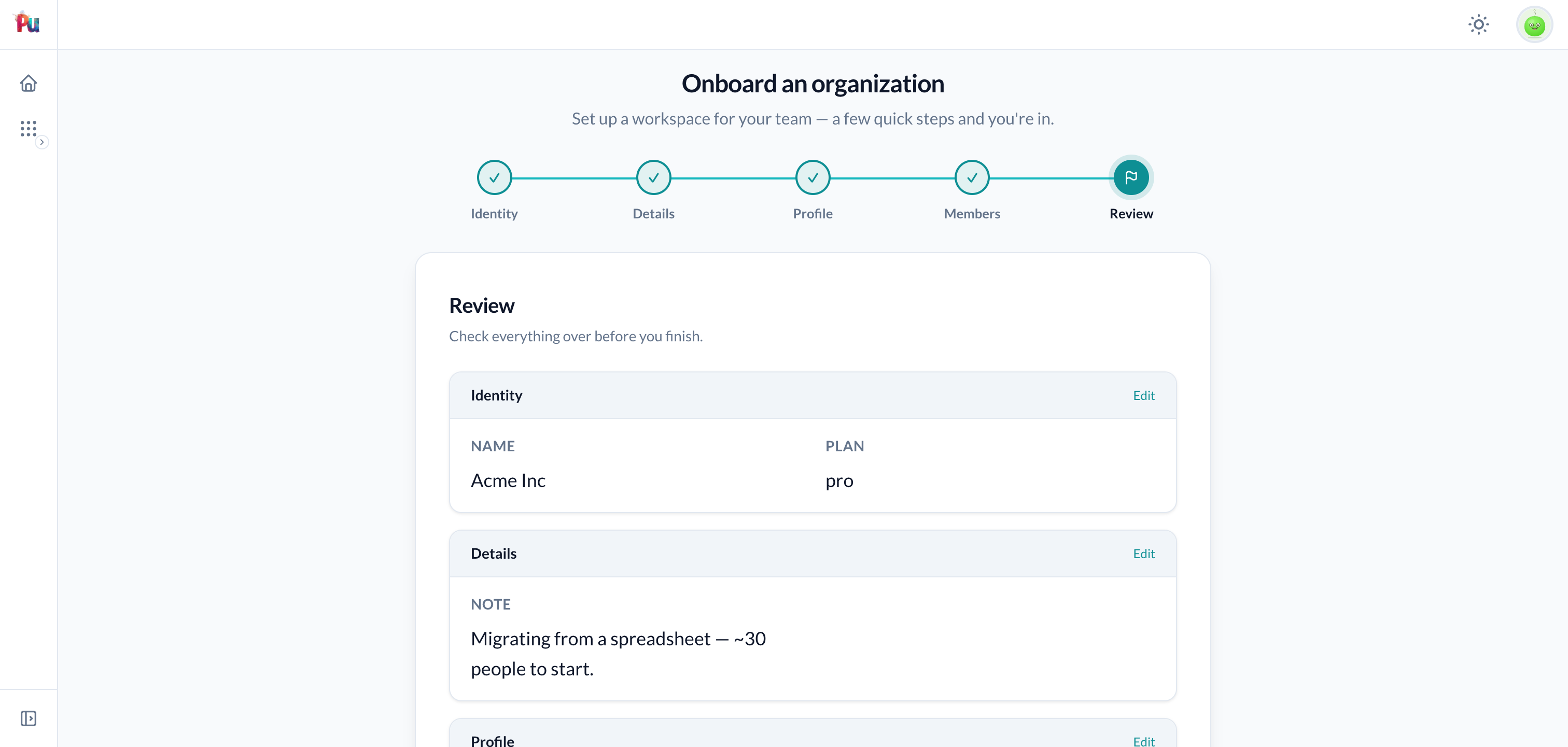
review is a built-in terminal step. It:
- Renders a read-only auto-summary of every visible step's data (reusing display components). The custom block, if any, renders below the summary.
- Lists invalid/unvisited visible steps as "fix this" jump links.
- Disables Finish until all visible steps are valid; clicking it runs
execute.
review label: "Review & submit"

# Custom content BELOW the auto-summary:
review label: "Review & submit" do |wizard|
  "By submitting you agree to the #{wizard.data.plan.plan} plan terms."
end
You can hand the body fully to your own design. The custom block sits below the summary by default; summary: false lets it replace the summary, and header: false drops the step-header (label + prompt). With summary: false and no block you get a built-in "ready to complete" panel. Pair with the wizard-level stepper false for a fully chromeless flow:
stepper false                          # no top rail
# ...
review summary: false, header: false   # no header, no summary → "ready to complete" panel
See the DSL reference for the complete state table.
Per-step writes: on_submit / persist / on_rollback
execute is the default: atomic, no orphans. Reach for per-step on_submit only when a real record must exist mid-flow (handing off to an external system that webhooks back, a reviewer who must see partial data, a payload too large for the session row).
class ConfigureCompanyWizard < Plutonium::Wizard::Base
  anchored with: Company
  cleanup_after 7.days

  step :billing, label: "Billing", condition: -> { anchor.paid_plan? } do
    attribute :card_token, :string
    input :card_token
    validates :card_token, presence: true

    # Runs when THIS step completes (opt-in save-as-you-go), in its own transaction.
    on_submit do
      charge = PaymentApi.authorize!(anchor, data.billing.card_token)
      fail!("Card was declined") unless charge.ok?   # → base error, stays on step
      # `persist` registers the record for resume + cleanup → persisted[:billing]
      persist Billing.create!(company: anchor, token: data.billing.card_token, charge_id: charge.id)
    end

    # ADDITIONAL cleanup on Cancel/abandonment. The engine ALWAYS destroys the
    # persist'd Billing record; on_rollback is only for side effects it can't see
    # (here, refunding the external charge). It runs BEFORE the destroy, so
    # persisted[:billing] is still alive to read.
    on_rollback { PaymentApi.refund!(persisted[:billing].charge_id) }
  end

  def execute
    anchor.update!(configured_at: Time.current)
    succeed(anchor).with_message("Company configured.")
  end
endon_submitruns in its own transaction when the step completes. Inside it,persist recordregisters record(s) the engine tracks for resume and cleanup, reachable later aspersisted[:step_key].fail!("msg")aborts the step with a base (form-level) error;fail!(:field, "msg")attaches it to a field. Both roll back the step's transaction and re-render with input intact.- The engine always destroys every
persist'd record on rollback (Cancel, abandonment-sweep, branch-prune), in reverse order, viadestroy!(which respects a model's own soft-delete override).on_rollbackis an optional, additive compensating block for side effects the engine can't see (refund a charge, call an external API), and runs before the destroy, sopersisted[:key]is still alive inside it. Don't destroy the tracked record yourself; the engine does. - Because
on_submitwrites mid-flow, it isn't atomic across steps; that's whycleanup_after+ the SweepJob exist. See Storage & config and the DSL reference. on_submit/on_rollbackare wizard-flow hooks, not a home for domain logic. They belong to a single wizard step and can't be called from anywhere else, so keep them to when and what gets tracked:persist Billing.create!(...)above is one call to a model. Once "authorize a card and record the billing row" is something the API also does, it becomesBilling.authorize!(company:, token:)and the hook shrinks topersist Billing.authorize!(...).
Anchored wizards
An anchored wizard runs against an existing record (like attribute :resource on an interaction). Read it via anchor.
class ConfigureCompanyWizard < Plutonium::Wizard::Base
  anchored with: Company      # operate on a Company

  step :branding, label: "Branding", using: Company, fields: %i[logo brand_color]

  def execute
    anchor.update!(configured_at: Time.current)
    succeed(anchor)
  end
end
anchored with: Company→ a single type.anchored with: [Company, Organization]→ polymorphic.anchored(nowith:) → generic, bound at registration.anchorraisesPlutonium::Wizard::NotAnchoredErrorif the wizard wasn't declaredanchored; it never returnsnil.- Omit
anchoredfor a pure create flow (the wizard creates the records it names itself).
See Anchoring & resume.
One-time onboarding + gate
A one-time wizard is a keyed wizard (concurrency_key) that retains its completed row as a durable marker. A controller gate redirects users into it until they finish.
class WelcomeWizard < Plutonium::Wizard::Base
  presents label: "Welcome"

  concurrency_key { current_user }   # the stable row to retain (tenant folded in)
  one_time                            # retain on completion → run once

  step :profile, label: "Your profile" do
    attribute :full_name, :string
    input :full_name
    validates :full_name, presence: true
  end

  review label: "All set?"

  def execute
    # User#complete_onboarding! sets the name and stamps onboarded_at. It lives on
    # the model because the gate below, an admin backfill, and the invite-accept
    # flow all need to mark a user onboarded, and none of them is a wizard.
    current_user.complete_onboarding!(full_name: data.profile.full_name)
    succeed.with_message("Welcome aboard!")
  end

  # Standalone wizards have no resource policy; gate entry with `authorize?`.
  def authorize?
    current_user.present?
  end
end
Gate a controller behind it with the Plutonium::Wizard::Gate concern:
module AdminPortal
  class DashboardController < AdminPortal::PlutoniumController
    include Plutonium::Wizard::Gate
    ensure_wizard_completed ::WelcomeWizard
  end
end
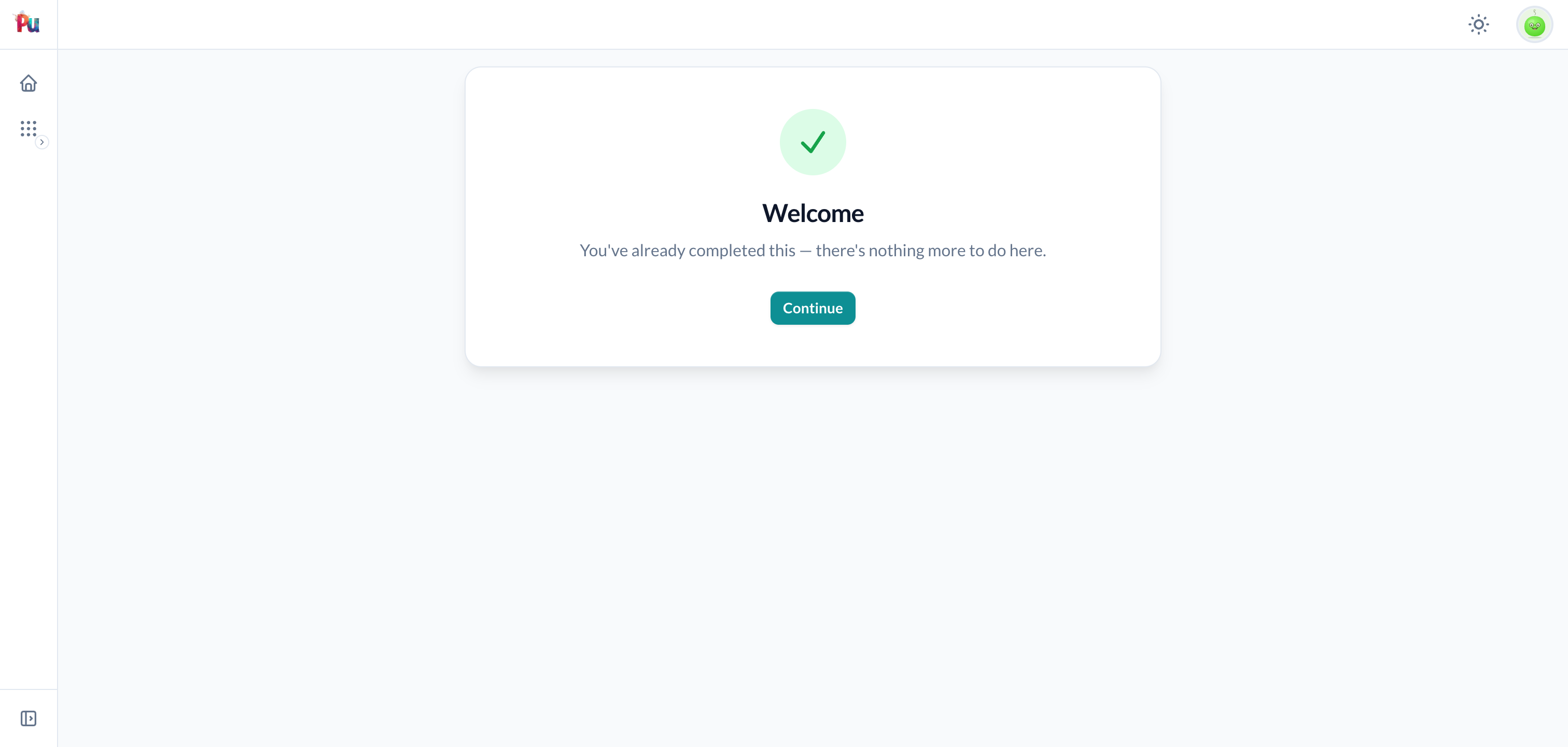
An un-completed user hitting the gate is redirected into the wizard (their destination stashed); on completion they're bounced back (PRG). Completed users pass straight through. Re-opening a finished one-time wizard renders an "already completed" page (override its body with a completed do |wizard| … end block) rather than re-running it:
See One-time wizards.
Registration & launch
A wizard reaches a user as a resource action (the wizard macro) or a route-mounted entry (register_wizard), inside a portal or on the main app. A portal mount inherits the portal's auth, tenant scoping, layout, and rendering; a main-app mount runs standalone.
On a resource: the wizard macro
Register a wizard on a resource definition. Placement follows anchored? automatically: an anchored wizard becomes a record action (the show page and each index row, like edit/destroy); a non-anchored wizard becomes a collection-level resource action.
class CompanyDefinition < Plutonium::Resource::Definition
  wizard :configure, ConfigureCompanyWizard     # anchored → record action (/companies/:id/wizards/configure/:step)
  wizard :onboard,   CompanyOnboardingWizard     # no anchor → resource action (/companies/wizards/onboard/:step)
end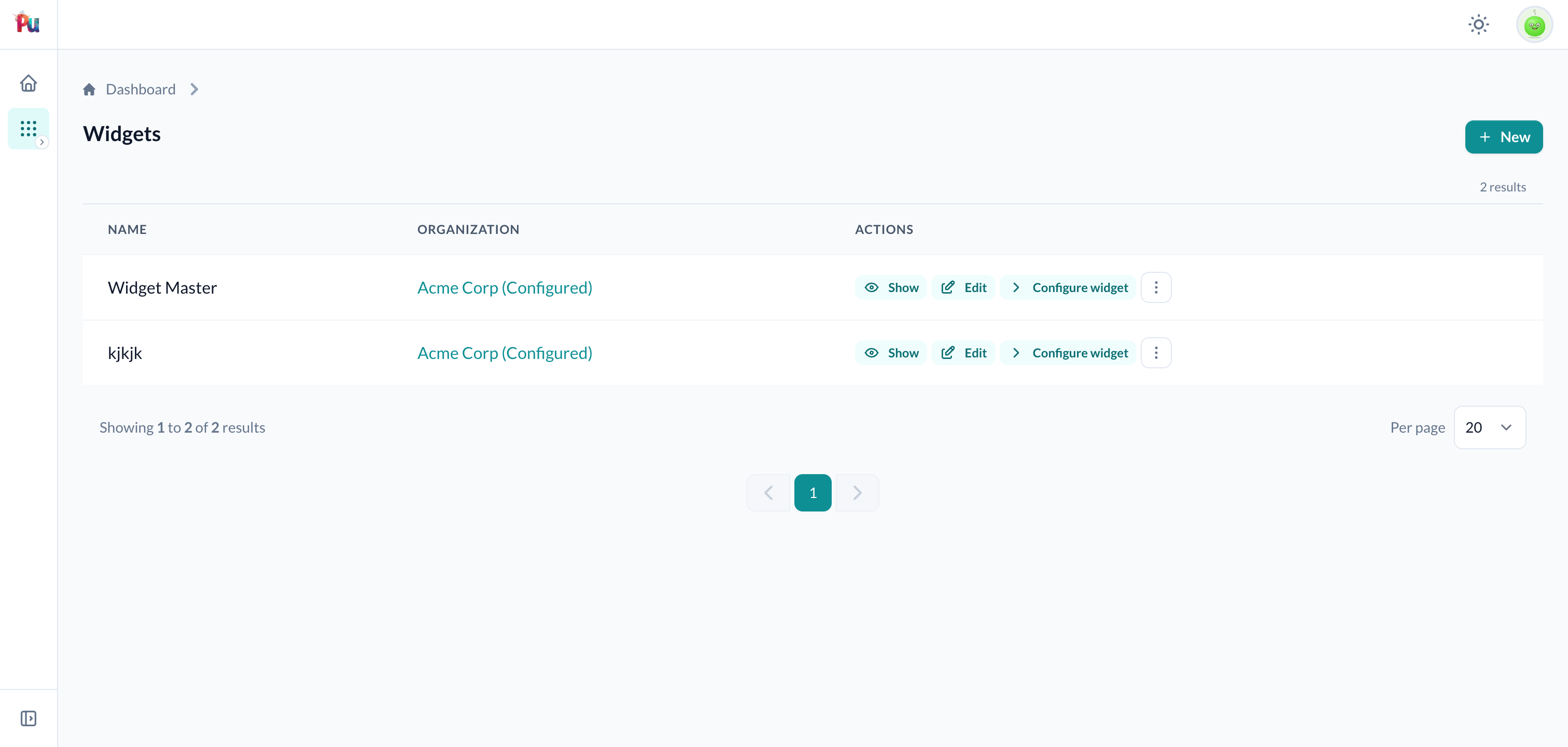
The anchor resolves through the resource controller's scoped, policy-gated resource_record! (IDOR-safe: an out-of-scope or missing id 404s), and the action is gated by a policy predicate named after the wizard key (def configure? = update?). For placement flags, routes, and the full option list see Registration & launch › the wizard macro.
Route-mounted: register_wizard
For a wizard not tied to a single resource (onboarding, welcome, set-up), mount it alongside register_resource, in a portal engine's routes or on the main app:
# packages/admin_portal/config/routes.rb
AdminPortal::Engine.routes.draw do
  register_wizard ::OnboardOrganizationWizard, at: "onboarding"      # in-shell (portal default)
  register_wizard ::SetupOrgWizard, at: "setup", layout: :basic      # bare (BasicLayout)
end
This draws the step routes within the host and gives you an onboarding_wizard_path helper. See Registration & launch › register_wizard for at:/as:/public:/layout:, the per-host layout defaults, and the controller override hook.
register_wizard wizards are open to any authenticated user by default
A register_wizard wizard (portal or main-app) has no resource policy and its default is def authorize? = true, so any authenticated user of that host can run it. Define def authorize? on every register_wizard wizard, including a gated one_time one (the gate forces users into the wizard but doesn't decide who may run it). Resource-mounted wizards are also gated by their action's policy predicate.
Authenticated main-app wizards: define your own controller
A portal mount inherits the portal's auth; a bare main-app mount has no current_user. An authenticated main-app wizard therefore needs you to define ::WizardsController yourself (include Plutonium::Wizard::Controller + your auth concern), the same "app owns the controller" contract as register_resource. See Hosting & the controller override hook.
Guest (unauthenticated) wizards
Wizards require authentication by default, and every resume is owner-scoped, so a run id leaked in a URL can't be picked up by another user. Opt into pre-login access with the anonymous macro and mount it public: true (the default for anonymous). A guest run's identity is a server-minted id held in the Rails session (never a URL, no leak surface); it may authenticate only at its terminal execute (e.g. a signup that creates the account and logs in):
class GuestSignupWizard < Plutonium::Wizard::Base
  anonymous

  step :account do
    attribute :email, :string
    input :email, as: :email
    validates :email, presence: true
  end
  review label: "Review"

  def execute
    succeed(Account.create!(email: data.account.email))   # may also sign the user in here
  end
end

register_wizard ::GuestSignupWizard, at: "signup", public: true
Full detail (owner-scoping, session-keying, the synthesized public controller): Authentication and the public mount.
Listing in-progress & resume-or-new
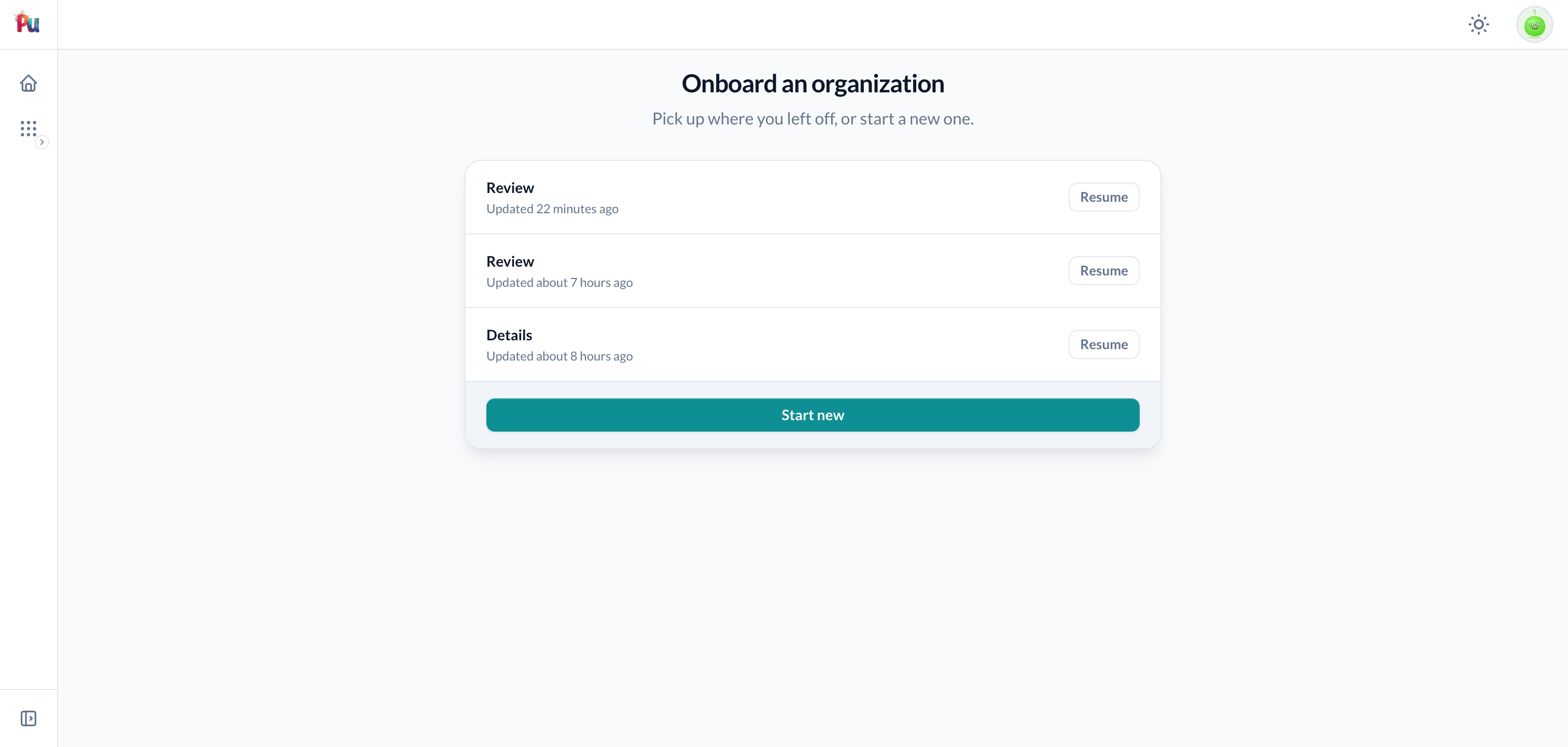
Build a "continue where you left off" dashboard with Plutonium::Wizard.in_progress_for(view_context), it derives the owner, tenant scope, and portal from the view context and returns that user's in-progress runs for the current portal, each carrying label / icon / current_step / updated_at / resume_url:
Plutonium::Wizard.in_progress_for(view_context).each do |entry|
  link_to entry.label, entry.resume_url if entry.resume_url   # resume_url is nil when unresolvable here
end

# narrow to one record's unfinished draft (query-time filters, index-covered):
Plutonium::Wizard.in_progress_for(view_context, wizard: ConfigureCompanyWizard, anchor: @company).first
A tokened wizard (no concurrency_key) doesn't silently fork on relaunch; by default it shows a resume-or-new chooser when a pending run exists (on_relaunch :new opts out). Keyed and guest wizards auto-resume their single run.
See Anchoring & resume › Listing for the full entry fields, portal-scoping rules, resume_unresolved_reason, and the filter performance notes.
Where to go next
- DSL reference: every macro and accessor.
- Anchoring & resume: anchors, instance keys, resume.
- Storage & config: the table, config, encryption, the sweep.
- Registration & launch: the
wizardmacro,register_wizard, routes. - One-time wizards: completion markers + the gate.