
User Invites
Set up token-based email invitations so admins can invite users into a tenant's membership.
Goal
An admin enters an email, the user gets an invite link, clicks it, signs up (or logs in if they already have an account) with that email, and is added to the org as a member.
Prerequisites
You need a user model, an entity model, and a membership model. The fastest path is pu:saas:setup: it creates all three and runs pu:invites:install automatically:
rails g pu:saas:setup --user Customer --entity OrganizationFor manual setup, ensure all three exist before running pu:invites:install.
Manual install
1. Run the generator
rails generate pu:invites:installOr with custom models:
rails g pu:invites:install \
  --entity-model=Organization \
  --user-model=Customer \
--membership-model=OrganizationCustomer| Option | Default | Description |
|---|---|---|
--entity-model=NAME | Entity | Entity model |
--user-model=NAME | User | User model |
--invite-model=NAME | <EntityModel><UserModel>Invite | Invite class name |
--membership-model=NAME | EntityUser | Membership join model (must already exist) |
--rodauth=NAME | user | Rodauth configuration for signup |
--enforce-domain | false | Require email domain to match entity |
Roles come from the membership model
pu:invites:install reads the role list from the membership model's enum :role; it does not accept a --roles= flag. Define roles when you generate the membership model (pu:saas:membership --roles=...), or edit the enum directly. Index 0 is the most privileged (typically owner); the invite interaction excludes owner from selectable choices and defaults new invitees to the second role.
2. Migrate
rails db:prepare3. Connect to your portal
# packages/customer_portal/lib/engine.rb
module CustomerPortal
  class Engine < Rails::Engine
    include Plutonium::Portal::Engine
    register_package Invites::Engine
  end
end
4. Wire the post-login redirect
# app/rodauth/user_rodauth_plugin.rb
configure do
  login_return_to_requested_location? true
  login_redirect "/welcome"

  after_login do
    session[:after_welcome_redirect] = session.delete(login_redirect_session_key)
  end
end
Now users are redirected to /welcome after login, where pending invites are shown.
The flow
1. Admin sends the invite
entity.invite_user(email: "user@example.com", role: :member)Or via the auto-generated "Invite User" action on the entity's show page.
2. Email goes out
Token-based URL: https://app.example.com/invitations/abc123...
3. User accepts
Clicking the link lands on the invitation page:
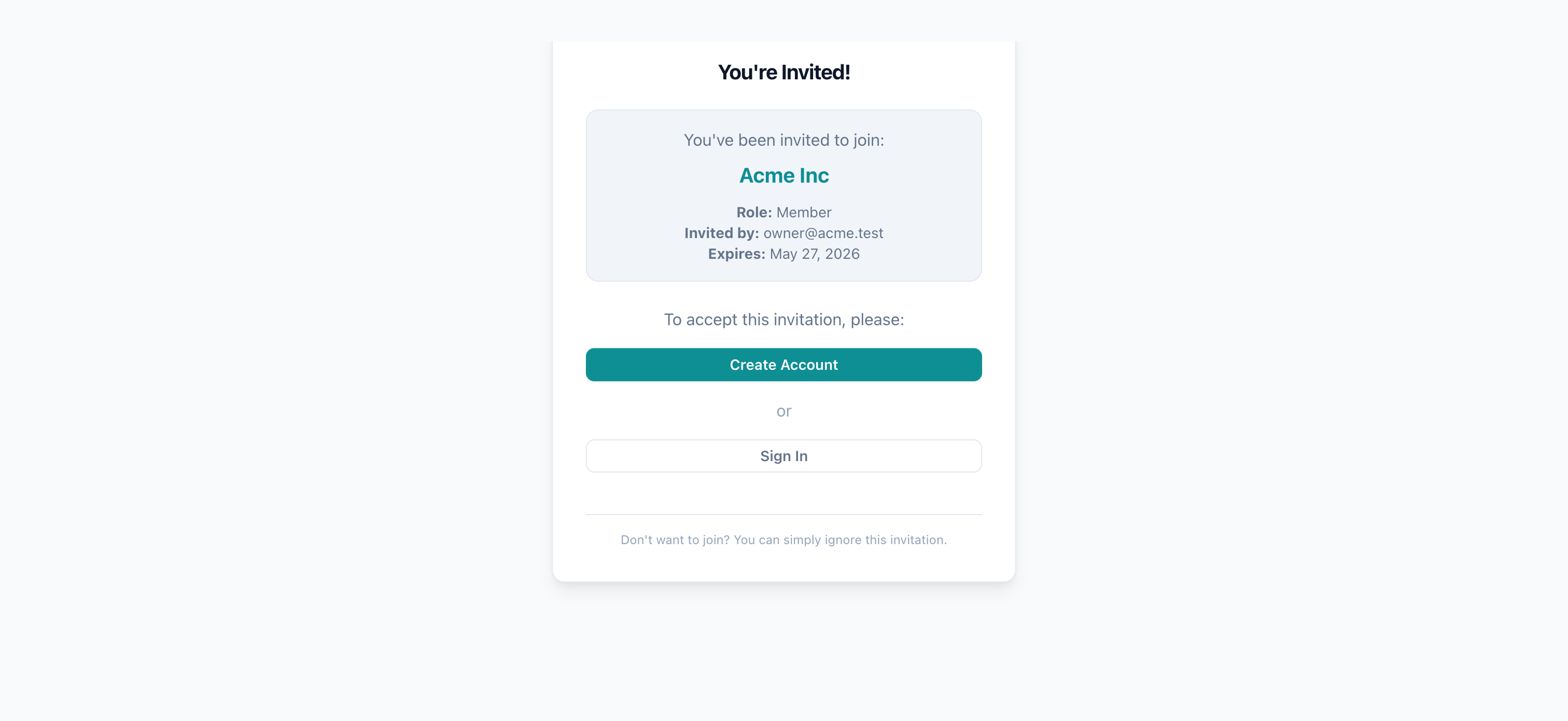
Existing user: clicks link → logs in (or already logged in) → email validated → membership created.
New user: clicks link → "Create Account" → signs up with the invited email → membership created.
4. After login
Users land on /welcome where pending invites are shown. Including Plutonium::Invites::PendingInviteCheck:
include Plutonium::Invites::PendingInviteCheckInvitables: app models notified on acceptance
An invitable is a model that gets notified when its invitation is accepted. Examples: Tenant, TeamMember, ProjectCollaborator.
rails g pu:invites:invitable Tenant
rails g pu:invites:invitable TeamMember --role=member
Then implement the callback:
class Tenant < ApplicationRecord
  include Plutonium::Invites::Concerns::Invitable

  belongs_to :entity
  belongs_to :user, optional: true

  def on_invite_accepted(user)
    update!(user: user, status: :active)
  end
end
Without on_invite_accepted
The invitable never learns about the new user: the invite is consumed but your app doesn't update its state.
Multiple invite flows in one app
Run pu:invites:install once per flow with different --entity-model / --user-model / --invite-model:
rails g pu:invites:install \
  --entity-model=FunderOrganization \
  --user-model=SpenderAccount \
  --invite-model=FunderInvite

rails g pu:invites:install \
  --entity-model=Project \
  --user-model=Member \
  --invite-model=ProjectInvite
Each invocation creates an independent flow: model, controller, route, helper all named for the invite-model.
The shared Invites::WelcomeController accumulates each new class into its invite_classes array; pending_invite checks all flows in priority order (first-match wins).
See Reference › Tenancy › Invites › Multiple invite flows.
Customization
Email templates
Override views in your package:
<%# packages/invites/app/views/invites/user_invite_mailer/invitation.html.erb %>
<h1>Welcome to <%= @invite.entity.name %>!</h1>
<p><%= @invite.invited_by.email %> has invited you.</p>
<p><%= link_to "Accept", @invitation_url %></p>
Custom validation
class Invites::UserInvite < Invites::ResourceRecord
  validate :email_not_already_member

  private

  def email_not_already_member
    existing = membership_model.joins(:user)
      .where(entity: entity, users: {email: email}).exists?
    errors.add(:email, "is already a member") if existing
  end
end
Domain enforcement
rails g pu:invites:install --enforce-domainRequires the invited email domain to match the entity's domain.
Custom expiration
class Invites::UserInvite < Invites::ResourceRecord
  TOKEN_EXPIRATION = 30.days   # default: 1 week

  def expired?
    created_at < TOKEN_EXPIRATION.ago
  end
end
Managing invitations
invite.resend!    # generates new token + sends email
invite.cancel!    # transitions to :cancelled state

entity.user_invites.pending    # list pending
Security
- Token security:
SecureRandom.urlsafe_base64(32), 256 bits, URL-safe. Stored hashed, raw token shown only at creation. - Email validation:
enforce_email?istrueby default. The accepting user's email must match the invited email; this prevents account hijacking via invite forwarding. - Rate limiting: use Rack::Attack or similar to throttle invite creation per admin and acceptance attempts per IP.
Don't disable enforce_email?
def enforce_email? = false # ← only if you fully understand the trade-offWithout this, anyone with the token can sign up, which defeats the purpose of an invitation system.
Common issues
- "Invitation not found or expired": token expired (default 1 week), invite cancelled, or no longer
pending. - Email mismatch error: the accepting user's email doesn't match the invited email. This is by design (security).
- Rodauth redirect after login doesn't go to
/welcome: checklogin_redirect "/welcome"in the rodauth plugin'sconfigureblock. on_invite_acceptednot called: ensure the invitable modelinclude Plutonium::Invites::Concerns::Invitableand defineson_invite_accepted.
Related
- Reference › Tenancy › Invites: full surface, multi-flow apps, customization
- Multi-tenancy: entity scoping (invites are entity-scoped automatically)
- Authentication: Rodauth setup
- User profile: account-settings page