
Kanban Boards
Experimental
Kanban boards are experimental: the DSL and behavior may change in a future release.
Turn any resource index into a drag-and-drop kanban board: columns, WIP limits, quick-add, column actions, and opt-in realtime, all from a single kanban do…end block in your definition.
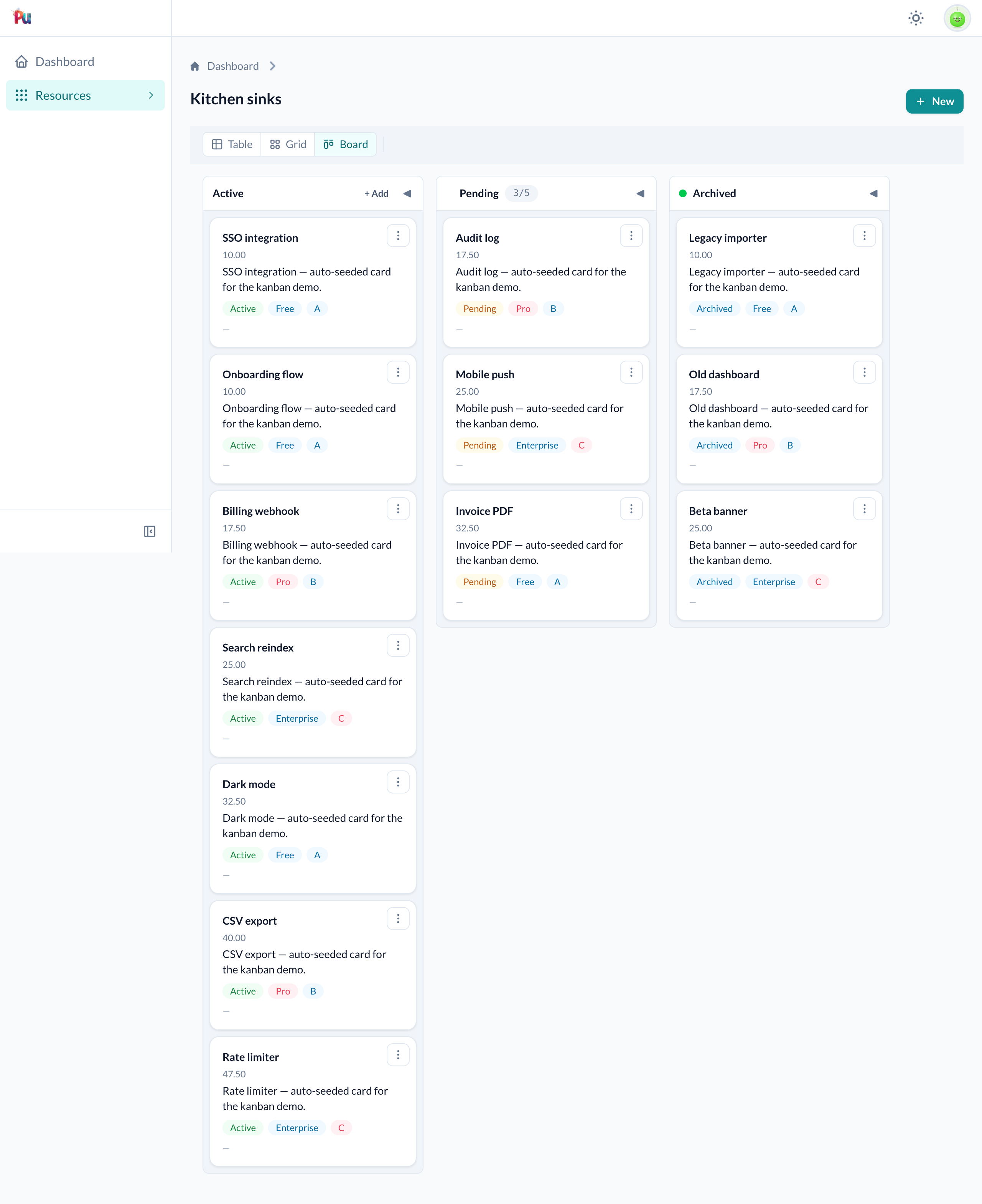
What you get
- Drag cards between columns; the server persists the column change and the position within the column.
- Decimal fractional positioning: cards always land exactly where you drop them without renumbering.
- Per-column
+ Addbutton opens the resource's normal new form; the new card is placed in that column (on_enter+ positioning applied post-create). - Column actions run an interaction against all (or visible) cards in a column.
- WIP limits, locked columns, and cross-column drop restrictions enforced server-side.
- Opt-in realtime: every connected viewer sees the same board state after any move.
Worked example: Task board
A complete board for a Task model grouped by status, migration, model, definition, and policy.
1. Migration
The model needs a decimal position column. Use the t.position helper, it adds a decimal column already tuned for fractional ordering (precision: 16, scale: 8), so you can't pick a scale too small to rebalance cleanly (see Positioning › Migration).
class CreateTasks < ActiveRecord::Migration[8.1]
  def change
    create_table :tasks do |t|
      t.string :title, null: false
      t.string :status, null: false, default: "todo"
      t.position        # decimal :position, precision: 16, scale: 8
      t.timestamps

      t.index [:status, :position]
    end
  end
end
2. Model
class Task < ApplicationRecord
  include Plutonium::Positioning::Model

  positioned_on :position, scope: :status
  # ^^ auto-assigns position on create; reposition! scopes to the same status

  validates :status, inclusion: { in: %w[todo doing done] }

  def mark_done!
    update!(status: "done")
  end
end
3. Definition
class TaskDefinition < ResourceDefinition
  kanban do
    per_column 25

    column :todo,
      scope: -> { where(status: "todo") },
      on_enter: ->(r) { r.update!(status: "todo") },
      role: :backlog          # shorthand for add: true

    column :doing,
      scope: -> { where(status: "doing") },
      on_enter: ->(r) { r.update!(status: "doing") },
      wip: 3

    column :done,
      scope: -> { where(status: "done") },
      on_enter: :mark_done!,   # Symbol → record.mark_done!
      accepts: [:doing],      # only cards from :doing can land here
      role: :done do          # shorthand for color: :green, collapsed: true
      action :archive_all,
        interaction: ArchiveTasksInteraction,
        on: :all,
        label: "Archive all"
    end
  end
end
4. Policy
A move is authorized via kanban_move?, which defaults to update?. Override it only when you want board-drag access to differ from full-edit access:
class TaskPolicy < ResourcePolicy
  # Allow all authenticated members to move cards,
  # but require :admin to edit the form directly.
  def kanban_move?
    true
  end
end
5. Routes: no changes needed
The kanban_move member route is wired automatically when the controller includes Plutonium::Resource::Controllers::KanbanActions (included by default in all Plutonium resource controllers).
Visit the resource index and use the view switcher to select the Kanban view.
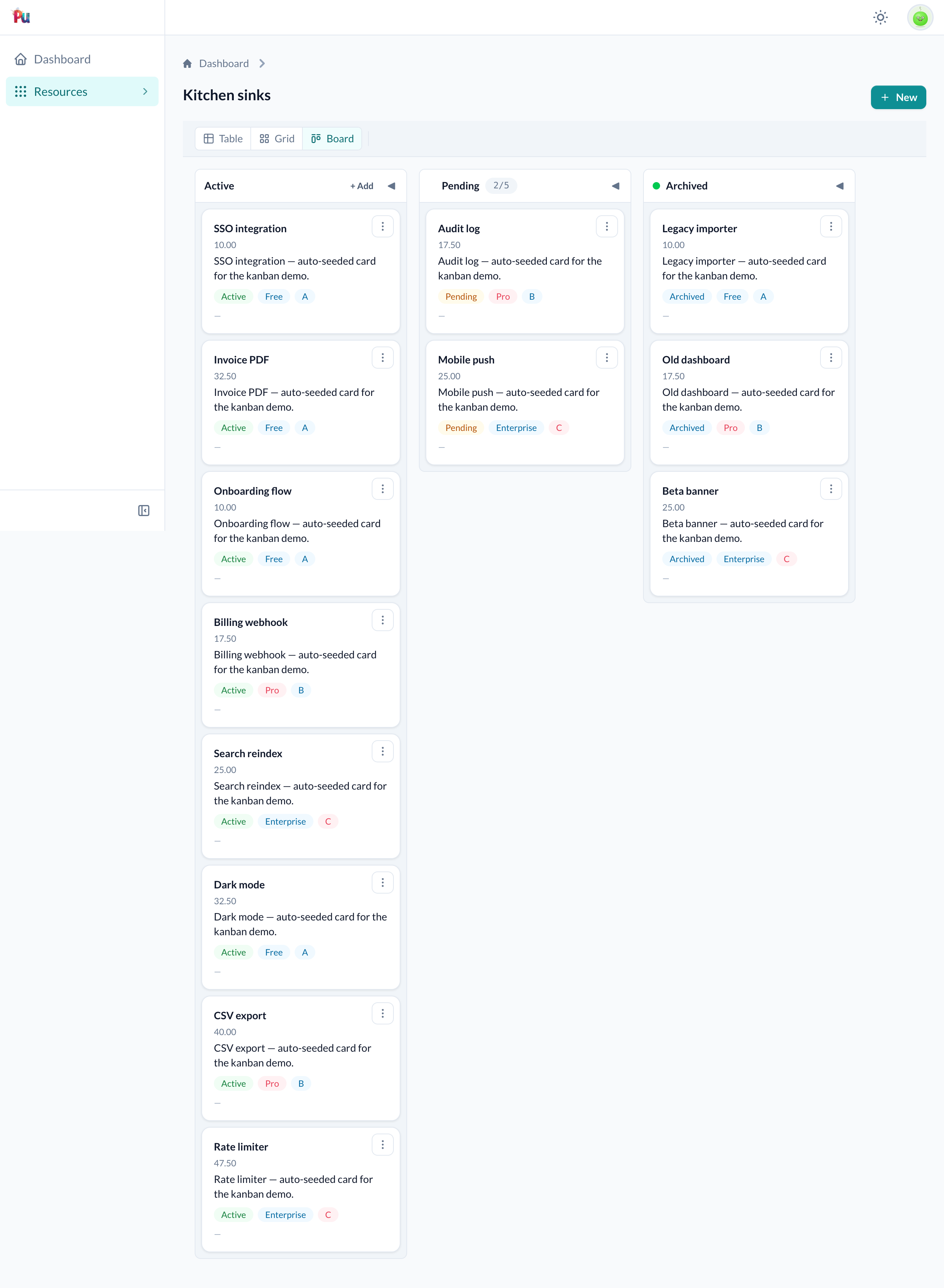
When a drop is rejected
If a move is refused server-side: the destination is at its wip: limit, its accepts: policy rejects the card, or the source column is locked:, then the card snaps back to where it started and a dismissable toast explains why:
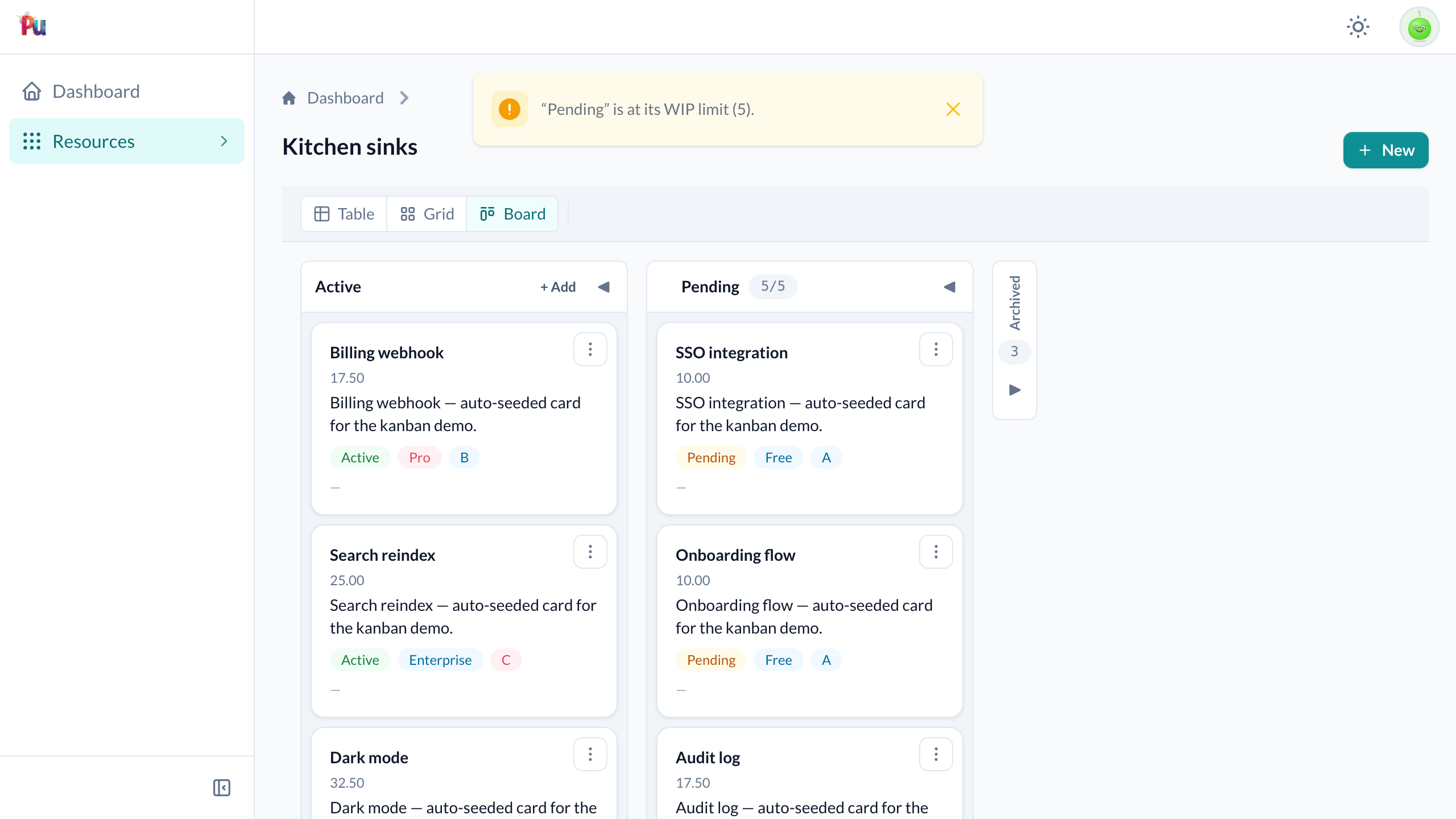
The toast is appended to a #kanban-flash region in the board shell (outside the per-column frames, so it survives the snap-back re-render). The client-side drag hints already grey out columns a card plainly can't enter, so the toast mainly surfaces the cases the browser can't pre-check, most commonly a WIP-full column or a kanban_move? denial.
Opening a card
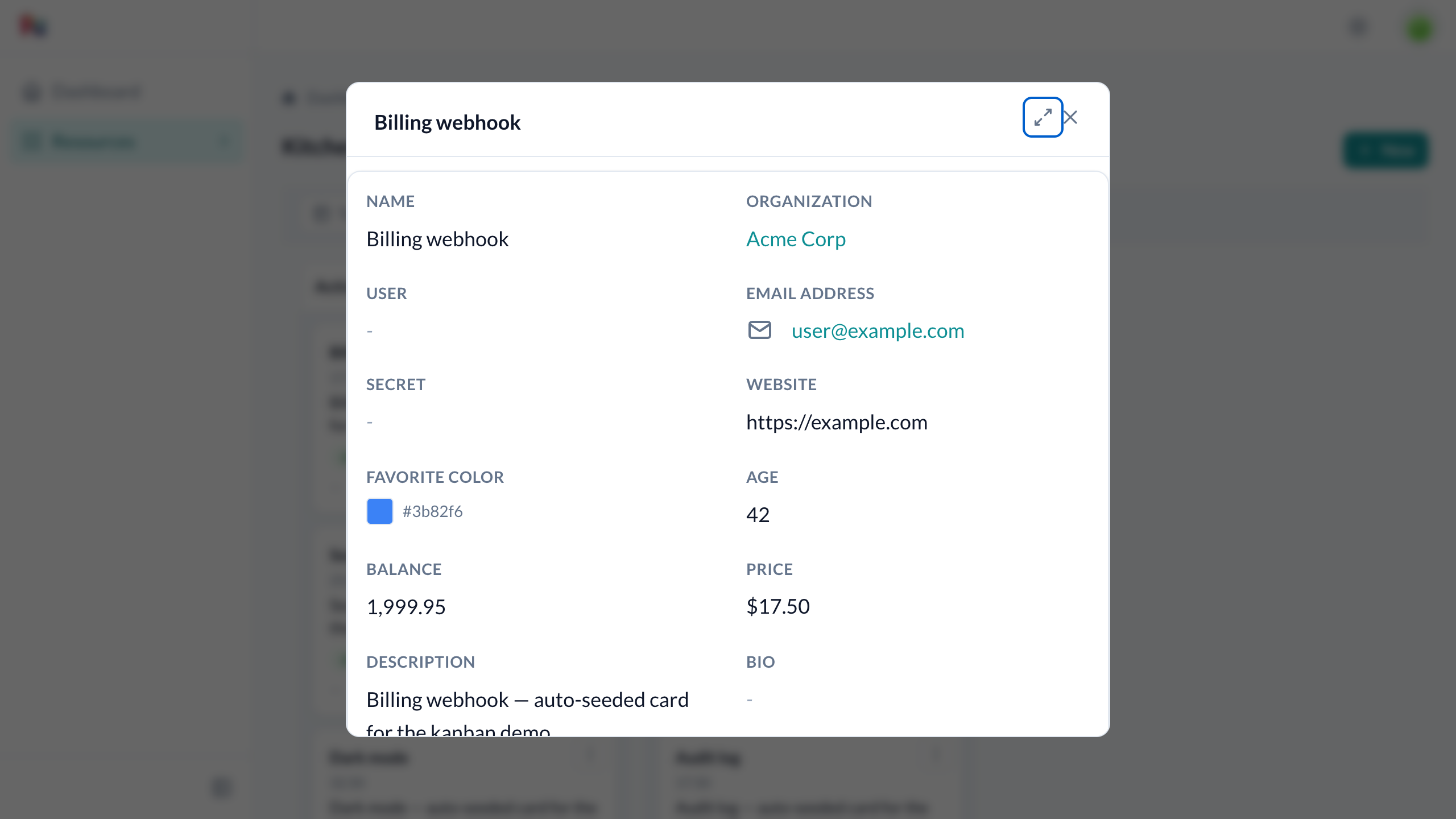
Clicking a card opens its show page. Where it opens is controlled by show_in, full-page by default, or a centered modal that keeps the board visible behind it:
class TaskDefinition < ResourceDefinition
  show_in :modal          # open show in a modal everywhere (table, grid, board)

  kanban do
    # show_in :page       # …or override just this board back to full-page
  end
end- Set
show_in :modalon the definition to open show in a modal from the table, grid, and board alike. Set it on the kanban block to change only the board. An unset board inherits the definition (which defaults to:page). - The show modal is always centered: distinct from
new/edit, which follow the definition'smodal_mode(a slideover by default). - From inside the modal, an expand icon opens the record's full page in a new tab. ⌘/Ctrl-click (or middle-click) on a card does the same directly.
Worked example: Status enum board
A shorter example that groups by a Rails enum for status. Cards reuse grid_fields for their slot layout, so no explicit card_fields needed.
class KitchenSinkDefinition < ResourceDefinition
  kanban do
    column :active, label: "Active", role: :backlog,
      scope:   -> { where(status: :active) },
      on_enter: ->(ks) { ks.status = :active }

    column :pending, label: "Pending", color: :yellow, wip: 5,
      scope:   -> { where(status: :pending) },
      on_enter: ->(ks) { ks.status = :pending }

    column :archived, label: "Archived", role: :done,
      scope:   -> { where(status: :archived) },
      on_enter: ->(ks) { ks.status = :archived }

    per_column 10
  end
end
Key points:
role: :backlogenables the+ Addbutton (equivalent toadd: true).wip: 5caps the Pending column; a cross-column drop that would push it past 5 is rejected server-side.role: :donecollapses the Archived column by default and shows a green header dot.on_enterhere assigns the attribute in memory (ks.status = :active). The framework callsrecord.save!automatically when the record has unsaved changes afteron_enterreturns; you do not need to callupdate!explicitly.
Columns
Static columns
Declared at definition class-load time with column :key, **opts:
kanban do
  column :backlog,
    label: "Product Backlog",      # default: key.to_s.titleize
    color: :blue,                  # dot color in the column header
    scope: -> { where(stage: 0) }, # 0-arg lambda evaluated on the relation
    on_enter: ->(r) { r.update!(stage: 0) }
end
Dynamic columns
Use columns do…end when the column list depends on request context (current_user, params, etc.):
kanban do
  columns do
    # `self` is the view_context: current_user, params, helpers all work.
    current_user.projects.map do |project|
      Plutonium::Kanban::Column.new(
        :"project_#{project.id}",
        label: project.name,
        scope: -> { where(project_id: project.id) },
        on_enter: ->(r) { r.update!(project_id: project.id) }
      )
    end
  end
end
Dynamic boards and column actions
Column actions declared inside a columns do…end block cannot be auto-registered at class-load time (the block is only evaluated at request time). Declare those interaction classes as top-level definition actions separately:
class TaskDefinition < ResourceDefinition
  # Must be a top-level action so the route exists at startup.
  action :archive_project_tasks, interaction: ArchiveProjectTasksInteraction

  kanban do
    columns do
      current_user.projects.map do |project|
        col = Plutonium::Kanban::Column.new(:"project_#{project.id}", ...)
        col.action :archive_project_tasks, interaction: ArchiveProjectTasksInteraction
        col
      end
    end
  end
end
Note that enter_interaction: is not supported on dynamic boards: its hidden action is registered from the static column list at class-load time, and its key is internal (column-scoped) so it can't be registered manually the way a column action can. A drop into such a column snaps back rather than committing (it doesn't crash). Use a static board if a column needs an enter_interaction:.
Column options
| Option | Type | Default | Description |
|---|---|---|---|
label: | String | key.to_s.titleize | Column header text |
color: | Symbol or String | nil | Dot color in the column header, :red, :orange, :amber, :yellow, :green, :blue, :purple, :pink, :gray, or a raw CSS value |
scope: | Symbol or Proc | nil | Filters the resource relation to this column's cards. Symbol → named scope; Proc → 0-arg lambda called with instance_exec on the relation (e.g. -> { where(status: "todo") }) |
on_enter: | Symbol or Proc | nil | Called when a card lands in this column. Symbol → record.public_send(sym); Proc → 1-arg lambda ->(record) { … } where self is the view context |
on_exit: | Symbol or Proc | nil | Source-side counterpart to on_enter:: called when a card leaves this column on a cross-column move, before the destination's on_enter, in the same transaction. For source-tied side effects (stop a timer, release a slot). Drag-moves only (not destroy/programmatic/quick-add); skipped on same-column reorders. Use a model callback instead only when other save paths (edit form, API, import) must be covered too, and then drop the on_exit: so the work isn't done twice. |
enter_interaction: | Class | nil | Record-scoped interaction run on a cross-column drop into this column; opens a modal to collect input, then commits atomically. See Interaction on drop |
role: | :backlog, :done, :lost | nil | Preset shorthand (see below) |
collapsed: | Boolean | false | Start collapsed |
add: | Boolean | false | Show + Add quick-add button |
accepts: | true, false, or Array of keys | true | Which source columns may drop here (structural, client-hintable). true = all, false = none, [:doing] = only from :doing. Record/user conditions go in kanban_move? instead (it sees the record and from/to); a Proc here raises |
locked: | Boolean | false | Prevent dragging cards out of this column |
wip: | Integer | nil | Work-in-progress limit. Cross-column drops that would exceed this count are rejected |
Role presets
| Role | Equivalent to |
|---|---|
:backlog | add: true |
:done | color: :green, collapsed: true |
:lost | color: :red, collapsed: true |
:done and :lost are the two terminal roles (both collapsed by default), the won/lost pair for pipelines like leads, deals, or tickets; the colour signals the outcome.
Explicitly provided options override the preset.
Collapse toggle: Click the arrow button in any column header to collapse or expand it. Collapsed columns render as a thin vertical strip with the label rotated. The Stimulus controller persists each column's collapsed/expanded state to localStorage (key: pu-kanban:<collection-path>:<column-key>:collapsed) so the preference survives page reloads. The collapsed: DSL option sets the server-rendered initial state; localStorage takes precedence on subsequent loads.
Column actions
Declare actions inside a column block to run an interaction against that column's cards:
column :done,
  scope: -> { where(status: "done") },
  on_enter: :mark_done! do

  action :archive_all,
    interaction: ArchiveTasksInteraction,   # must be a bulk interaction (has `attribute :resources`)
    on: :all,                               # :all (default) or :visible
    label: "Archive all",
    icon: Phlex::TablerIcons::Archive,
    confirmation: "Archive all done tasks?"
end
on: :all: passes IDs of all cards in the column (ignoringper_column).on: :visible: passes IDs of only the rendered,per_column-capped cards.
Column actions are rendered as buttons in the column header. They open the normal interactive-action modal (with form, authorization, success/failure handling) pre-loaded with the column's card IDs.
Interaction on drop
A column can declare enter_interaction: to run an authorization-aware, input-collecting Interaction when a card is dropped into it from another column. Use it when entering a column needs more than a membership flip, a reason, a notification email, an audit entry.
column :lost,
  scope: -> { where(status: "lost") },
  enter_interaction: MarkLostInteraction
enter_interaction: takes an Interaction class. It must be record-scoped: it declares attribute :resource and acts on the single dropped card. A bulk (attribute :resources) interaction is not valid here; that shape is for column actions.
The interaction is auto-registered as a hidden record action under a column-scoped key (:lost → :lost_enter_interaction), so two columns can reuse the same interaction class without colliding. "Hidden" means it does not appear as an action button on the show page, table rows, or grid cards, it is reachable only by dropping a card into the column.
The interaction
A drop interaction is an ordinary record-scoped interaction with nothing kanban-specific in the class:
class MarkLostInteraction < ResourceInteraction
  presents label: "Mark Lost",
    icon: Phlex::TablerIcons::X

  attribute :resource
  attribute :reason, :string

  input :reason

  validates :reason, presence: true

  def execute
    resource.update!(status: "lost", lost_reason: reason)
    succeed(resource).with_message("Marked as lost")
  end
end
Authorization
The drop is authorized by the single kanban_move? predicate, the interaction has no policy method of its own. To gate this specific transition, branch on the destination column, which kanban_move? reads from its authorization context (kanban_to):
class TaskPolicy < ResourcePolicy
  def kanban_move?
    return update? if kanban_to&.key == :lost   # who may mark a task lost
    super
  end
end
This keeps authorization in one place: kanban_move? gates every move, and the to (and from) column context lets it gate a specific transition: no per-interaction predicate, no condition: proc. If the check fails the drop is refused and the card stays put. See Authorization for the full from/to context.
Two flows, split by intent
- Move flow (drag a card cross-column). Dropping into the column opens the interaction's form as a modal to collect input (the
reason). On submit, the membership write (on_enter, if any), the interaction, and the repositioning are committed in one atomic transaction. - Quick-add (
+ Add). The+ Addbutton creates the record, then applieson_enter+ positioning post-create (see Quick-add). Theenter_interactionis not involved in quick-add.
Author contract: on_enter owns membership, the interaction owns extras
A column can declare on_enter: and enter_interaction: together. When it does:
on_enterowns the membership attribute (the column's grouping value, e.g.status).enter_interactionowns the extras: the reason, the mail, the audit trail.
If the interaction also writes the membership attribute it must set the same value on_enter sets (idempotent). In this dummy-app example the :blocked column does exactly that, on_enter sets status = "blocked" and the interaction's execute re-asserts status: "blocked" while adding the reason:
column :blocked,
  scope: -> { where(status: "blocked") },
  on_enter: ->(r) { r.status = "blocked" },
  enter_interaction: BlockTaskInteraction
When a column declares only a enter_interaction (no on_enter, like :lost above), the interaction owns everything, including the membership write, because there is no on_enter to do it.
Same-column drops run positioning only
Reordering a card within its current column runs positioning only. Neither on_enter nor the enter_interaction fires; both represent entering a column, and a same-column reorder is not an entry. Only cross-column drops trigger them.
Atomicity and failure
Interaction validation failure rolls the whole transaction back, the membership write included, and re-renders the modal with errors. The move context is preserved, so the user can fix the input and resubmit. Nothing is persisted on failure. Keep side-effects on deliver_later (mailers, jobs): a rolled-back failure then sends no stray mail, because the enqueue never commits.
Success feedback and the response limitation
On success the board's column frames re-render and the modal closes. The interaction's success message (succeed(resource).with_message("Marked as lost")) is surfaced as a toast.
Custom success responses are not honored on the drop path
A drop interaction's custom success response, with_redirect_response, with_file_response, etc., is not honored when it runs from a drop: the board simply re-renders and closes the modal. Keep drop interactions to simple state + extras mutations, and use .with_message for feedback.
There is no card "snap-back" to worry about on cancel: native drag never moves the card's DOM node, so canceling the modal just closes it and the card stays where it was.
Positioning
By default Plutonium uses decimal fractional positioning: cards always slot exactly where you drop them without ever renumbering the whole column. You need:
- A
decimaldatabase column: use thet.positionhelper (precision: 16, scale: 8). Hand-rolling it, keepscaleat 8 or more:scale: 6exactly matches the1e-6rebalance threshold and the last subdivision can round into a neighbour. include Plutonium::Positioning::Modelin the model.positioned_on :position, scope: :status: thescope:option groups positions by the grouping attribute so cards in different columns don't compete.
Position modes
position_on is the same verb inside and outside kanban do…end. Declared on the definition it makes the resource's index table and card grid drag-reorderable; declared inside the board it configures the board. A board that declares none inherits the definition's (falling back to :position, Mode A), so a resource that already reorders in its table needs nothing extra here. Declaration order in the class body doesn't matter; the board resolves this lazily.
kanban do
  # Mode A (default): delegate to Plutonium::Positioning::Model.
  # Uses :position attribute, requires the model concern.
  position_on :position

  # Mode A with a custom attribute name:
  position_on :sort_order

  # Mode B: BYO positioning. The block receives a Move struct.
  # Use when you want to call a custom service or use a different ordering scheme.
  position_on :sort_order do |move|
    # move.record : the dropped record
    # move.column : the destination column key (Symbol)
    # move.prev   : the record immediately before the drop slot (or nil)
    # move.next   : the record immediately after the drop slot (or nil)
    # move.index  : 0-based insertion index within the destination column
    MyPositioningService.call(move.record, prev: move.prev, next: move.next)
  end

  # Mode C: no ordering. Cards render in the relation's default order.
  # On-drop still fires; position is just never updated.
  position_on false
end
See Positioning reference for the full API and the rebalancing behavior when the decimal gap is exhausted, and Positioning & drag-to-reorder for the table/grid side of the same feature.
Per-column card limit
kanban do
  per_column 25
  # ...
end
Each column loads at most 25 cards. When the total exceeds the limit, a +N more footer appears. Column actions with on: :visible respect the cap; on: :all ignores it.
Quick-add
When add: true (or role: :backlog) is set on a column, a + Add button appears in the column header. Clicking it opens the resource's normal new form in a modal.
The record is created normally, and then the column's on_enter and positioning are applied to the saved record, so the new card lands in the clicked column, appended to the bottom. on_enter runs against a real, persisted record (exactly as it does for a drag), so update!-style callbacks and any side effects behave identically and fire once, on the actual create.
Give your grouping column a default
Because on_enter runs after the record is saved, the record must be creatable without a grouping value. Give your grouping column (e.g. status) a database or model default. If it is NOT NULL with no default, quick-add create fails validation before on_enter can set it.
If on_enter (or positioning) raises after the record was created, the create is not rolled back: the record is kept in its default column (validly positioned there) and the failure is surfaced as a toast.
Authorization: the button is only rendered when create? returns true in the current policy.
Authorization
Every drag-and-drop move is authorized by the kanban_move? policy predicate. By default it delegates to update?. Override it in your policy to decouple board move rights from full edit-form access:
class TaskPolicy < ResourcePolicy
  # Board drags require only :member role; full edit requires :admin.
  def kanban_move?
    user.member?
  end

  def update?
    user.admin?
  end
end
When kanban_move? returns false, the board is rendered read-only (dragging is disabled). See Authorization reference for details.
Realtime updates
Enable opt-in realtime broadcasting so every viewer of the same board sees moves immediately:
kanban do
  realtime true
  # ...
end
After a successful move, Plutonium broadcasts the updated column frames to all connected viewers on the same stream. Stream names are tenant-scoped: viewers of different tenant entities can never cross-contaminate each other's streams. See Reference › Kanban › DSL for the stream name format.
Setup (required for realtime to actually update other viewers)
Plutonium emits the <turbo-cable-stream-source> subscription element and broadcasts on the server, but the client must have an ActionCable consumer to receive it. Plutonium's bundled JavaScript ships @hotwired/turbo only (no cable client), so you must wire the rest up yourself:
- Gems:
turbo-railsandactioncable(Rails includes ActionCable;turbo-railsprovidesTurbo::StreamsChannelandturbo_stream_from). - Cable adapter (
config/cable.yml):asyncis fine for a single-process dev server; use Redis (or Solid Cable) for multi-process production, otherwise a broadcast from one worker won't reach clients connected to another. - Mount ActionCable:
mount ActionCable.server => "/cable"(Rails mounts it by default whenaction_cable/engineis loaded). - Load the cable client in your app's JavaScript: this is the step most people miss. Add one of:js…or, if you only want ActionCable:
// app pack, alongside your other imports import "@hotwired/turbo-rails" // registers <turbo-cable-stream-source> + a consumerjsWithout this, the server broadcasts but no browser is subscribed, so other viewers won't update until they reload.import * as ActionCable from "@rails/actioncable" window.ActionCable ||= ActionCable
Verify it
With two browser tabs on the same board, move a card in one; the other should update without a reload. If it doesn't, check the browser console/network for a /cable WebSocket connection; a missing connection means the cable client (step 4) isn't loaded.
Lazy loading
By default (lazy true), each column is a Turbo Frame that loads its card list on demand when it enters the viewport. Set lazy false to load all columns eagerly on the initial page request:
kanban do
  lazy false
  # ...
end
Switching views
The index page renders a view-switcher toggle when more than one index view is available (:table, :grid, :kanban). Declare the default:
class TaskDefinition < ResourceDefinition
  kanban do
    # ...
  end

  # Call AFTER the kanban block: :kanban isn't a valid default until
  # `kanban` has enabled the view. Reversing the order raises ArgumentError
  # at class load.
  default_index_view :kanban
end
To make the kanban board the only view (hide the switcher), call index_views :kanban after the block:
class TaskDefinition < ResourceDefinition
  kanban do
    # ...
  end

  index_views :kanban   # drop :table/:grid; kanban is the sole view
end