
Custom Actions
Add buttons beyond CRUD: Publish, Archive, Import, Send invitation, Bulk-update, etc.
Goal
A button appears in the right place (show page / table row / index header / bulk-actions toolbar), the user clicks it, optional form collects input, business logic runs, a success/failure message appears.
Two flavors
| Flavor | Use for |
|---|---|
| Simple action: navigate to a URL | Linking to external docs, jumping to a custom page that does its own thing |
| Interactive action: run an interaction class | Anything that does something (the common case) |
Prefer interactive actions. They handle authorization, form rendering, modal chrome, success/failure messaging, and automatic redirects, all for free.
Quick recipe: interactive action
1. Write the interaction
# app/models/post.rb: what publishing actually means
class Post < ApplicationRecord
  def publish!(on: Time.current)
    update!(published: true, published_at: on)
  end
end# app/interactions/publish_post_interaction.rb: the button in front of it
class PublishPostInteraction < ResourceInteraction
presents label: "Publish",
icon: Phlex::TablerIcons::Send,
description: "Make this post public"
attribute :resource
def execute
resource.publish!
succeed(resource).with_message("Post published!")
rescue ActiveRecord::RecordInvalid => e
failed(e.record.errors)
end
endRescue ActiveRecord::RecordInvalid
Plutonium doesn't rescue it automatically. Always rescue when using create! / update! / save!, return failed(e.record.errors).
Why publish! is on the model
An interaction can only be built with a view_context; it's a presentation object. A two-line update! inline in execute is fine while the button is the only caller; the moment a scheduled-publishing job wants the same behaviour it has to duplicate it or fake a view context. Full rule: Interactions › What an interaction is for.
2. Register it in the definition
class PostDefinition < ResourceDefinition
  action :publish, interaction: PublishPostInteraction
end
Action visibility (record / bulk / resource) is inferred from the interaction's attributes; no need to declare record_action: true. See Inferred visibility below.
3. Add a policy method
class PostPolicy < ResourcePolicy
  def publish? = update? && record.draft?
end
🚨 Without this, the button silently disappears (undefined methods return false).
4. Visit the show page
The "Publish" button appears in the toolbar. Clicking it shows a "Publish?" confirmation, then runs.
Inferred visibility
For interaction:-based actions, visibility flags are inferred from the interaction:
| Interaction declares | Inferred flag → button shows up |
|---|---|
attribute :resource | record_action: true + collection_record_action: true → show page + per-row |
attribute :resources (plural) | bulk_action: true → bulk toolbar |
| neither | resource_action: true → index page header |
User-supplied flags can only opt OUT of inferred ones. Don't try to "broaden"; the interaction's attribute shape is semantic:
# Hide from per-row menu, keep on show page
action :archive, interaction: ArchiveInteraction, collection_record_action: false

# Hide from show page, keep per-row only
action :preview, interaction: PreviewInteraction, record_action: false
For simple navigation actions (no interaction:), declare flags manually.
With form inputs
If the interaction declares extra attribute/input, a modal form is rendered first:
class Company::InviteUserInteraction < ResourceInteraction
  presents label: "Invite User", icon: Phlex::TablerIcons::Mail

  attribute :resource   # the company
  attribute :email
  attribute :role

  input :email, as: :email
  input :role,  as: :select, choices: %w[admin member]

  validates :email, presence: true, format: {with: URI::MailTo::EMAIL_REGEXP}
  validates :role,  presence: true

  def execute
    resource.invite!(email: email, role: role, by: current_user)
    succeed(resource).with_message("Invitation sent to #{email}.")
  rescue ActiveRecord::RecordInvalid => e
    failed(e.record.errors)
  end
end
Company#invite! creates the row and sends the mail. Both are things a seat-provisioning job needs to do without a browser anywhere in sight, see the full worked example.
Bulk actions
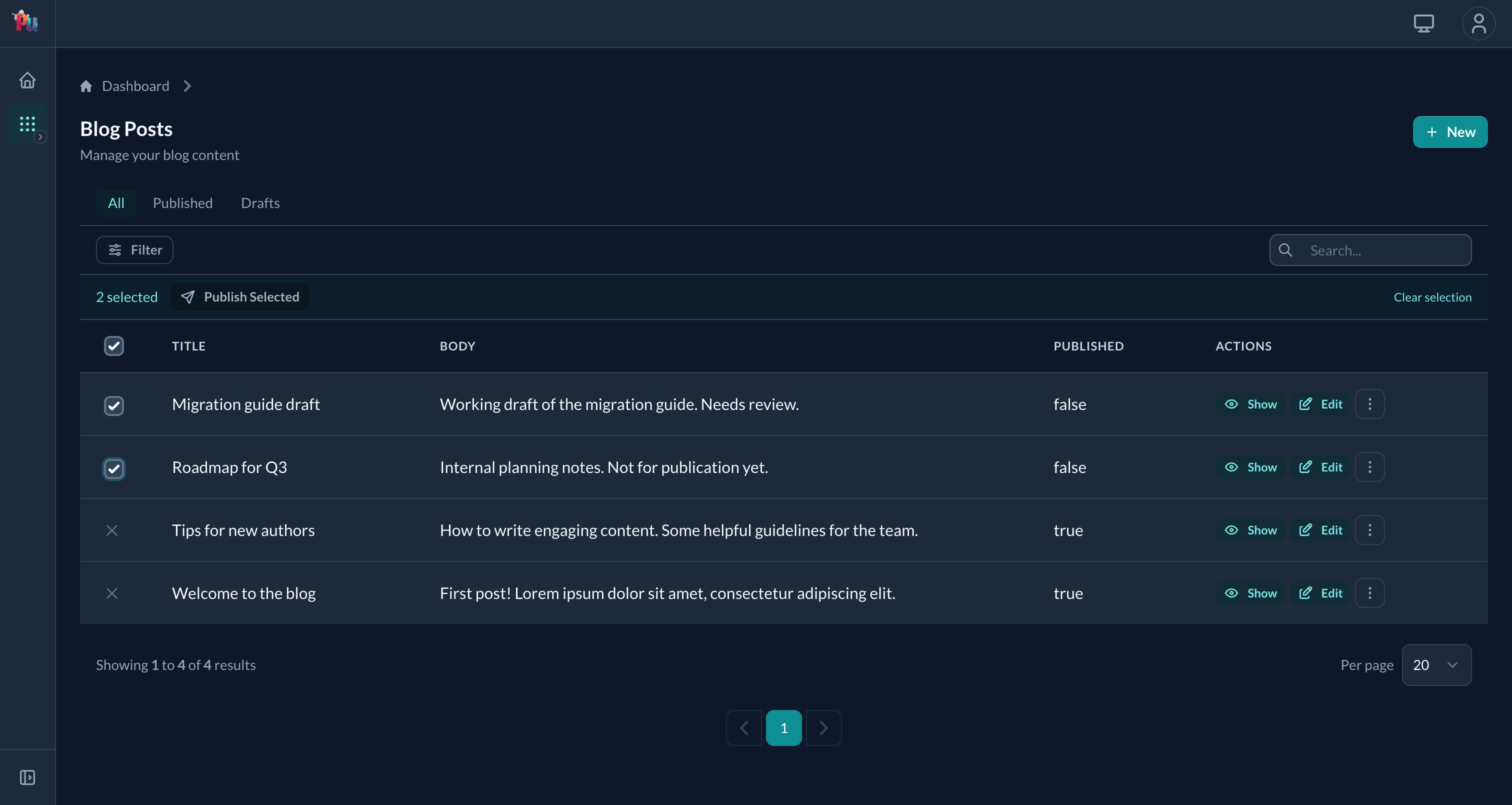
Plural attribute :resources automatically becomes a bulk action. The table gets checkboxes and a bulk-actions toolbar.
class BulkArchiveInteraction < ResourceInteraction
  presents label: "Archive Selected", icon: Phlex::TablerIcons::Archive

  attribute :resources

  def execute
    resources.update_all(archived: true)
    succeed(resources).with_message("Archived #{resources.size} records.")
  end
end
Policy: checked per record (fails the whole request if any record is unauthorized):
def bulk_archive?
  create? && !record.locked?
end
Two related behaviors:
- A row gets a
✕instead of a checkbox when no bulk action applies to it (no*_bulk?policy method on that record returns true). - A bulk action only appears in the toolbar when every selected row supports it. Mixing one unsupported row hides the action until you deselect.
When the work is too slow for a request
The bulk action above updates every selected record inside the request. That is fine for a screenful; it is not fine for a few thousand, or for anything that calls a slow third party. Swap execute for async, and the same interaction dispatches the work to a background run instead:
class BulkArchiveInteraction < ResourceInteraction
  presents label: "Archive Selected", icon: Phlex::TablerIcons::Archive

  attribute :resources
  attribute :reason, :string

  async do
    on_failure :continue          # :halt (default) | :continue | :transactional
    def perform_on(record)
      record.archive!(reason: options["reason"])
    end
  end
end
Nothing else about the action changes: the definition, the policy method and the form are the same. Only the work moves.
Three things worth knowing:
- The block is the run's class body, not
execute. The work runs later, in a job with no controller, so it cannot close over anything in the interaction. Its inputs arrive throughoptions. - The user is sent back where they were, and the index they land on shows a banner for the run with a link to its progress page.
- Permissions are re-checked per record, at perform time: not replayed from dispatch. A permission revoked while the run is working stops applying to the rest of it.
Full detail, including file attributes, failure policies and resuming a crashed run: Async Interactions.
Resource action (no specific record)
Neither :resource nor :resources → resource action on the index page:
class ImportInteraction < ResourceInteraction
  presents label: "Import CSV", icon: Phlex::TablerIcons::Upload

  attribute :file
  input :file, as: :file
  validates :file, presence: true

  def execute
    # …import logic
    succeed(nil).with_message("Import completed.")
  end
end
Immediate vs form
- Immediate: interaction has only
:resource/:resources(no extra inputs). Browser confirmation ("#{label}?", e.g."Archive?"), then runs. Override withconfirmation: "Custom message"orconfirmation: falseon the action. - Form: interaction has additional
attribute/input. Renders modal form first; no auto-confirmation (the form is the confirmation).
Action options
action :name,
  # Display
  label:       "Custom Label",
  description: "What it does",
  icon:        Phlex::TablerIcons::Star,
  color:       :danger,                  # :primary, :secondary, :danger

  # Grouping
  category: :primary,                    # :primary, :secondary, :danger
  position: 50,

  # Behavior
  confirmation: "Are you sure?",
  modal: :slideover,                     # :slideover / :centered, overrides definition's modal mode
  size:  :lg,                            # :sm / :md / :lg / :xl / :auto / :full, overrides definition's modal size

  # HTML attributes: author wins over the framework's on every key
  link:   {target: "_blank", rel: "noopener"},  # every <a> rendering (toolbar GET link, dropdown items, bulk links, card show link)
  button: {data: {analytics: "archive"}}        # the button_to <form> wrapper (non-GET toolbar rendering)
Full options: Reference › Resource › Actions › Action options.
Simple actions (navigation only)
When you just want to link somewhere:
action :documentation,
  label: "Docs",
  route_options: {url: "https://docs.example.com"},
  icon: Phlex::TablerIcons::Book,
  resource_action: true,
  link: {target: "_blank", rel: "noopener noreferrer"}   # open in a new tab

action :reports,
  route_options: {action: :reports},   # links to PostsController#reports
  resource_action: true
Custom routes MUST be named:
register_resource ::Post do
  collection { get :reports, as: :reports }   # ← `as:` is required
end
Without as:, resource_url_for can't build the URL.
Inherited actions
Actions defined on the base ResourceDefinition propagate to every resource:
# app/definitions/resource_definition.rb
class ResourceDefinition < Plutonium::Resource::Definition
  action :archive, interaction: ArchiveInteraction, color: :danger, position: 1000
end
Every resource gets :archive automatically.
Where the logic goes
Interactions are presentation objects: they need a view_context to exist at all. So the reflex to reach for when an operation grows:
# 🚫 Three interactions, three view contexts, none of it callable from a job
CreateUserInteraction.call(view_context:, **user_params)
  .and_then { |user| SendWelcomeEmail.call(view_context:, user:) }
.and_then { |user| LogActivity.call(view_context:, user:) }# ✅ One model method; the interaction just presents it
def execute
user = User.register!(**attributes) # welcome email + audit row live in here
succeed(user).with_message("Welcome aboard!")
endSending a welcome email and writing an audit row are exactly what a signup API endpoint or a rake task also does, and neither has a view context to hand.
The rule isn't "never put logic in an interaction". A single-caller operation can stay inline in execute; don't pre-extract. The second caller is the trigger, and the destination is the model, Rails-style, not a new service layer. Chaining three interactions is usually the tell that you already crossed it. Full explanation: Interactions › What an interaction is for.
Common issues
- Action button missing: check the policy method (
def my_action?). Undefined returnsfalse. ActiveRecord::RecordInvalidcrashes the action: not rescued automatically. Wrap withrescue, returnfailed(e.record.errors).- Bulk action fails on some records: that's by design. Bulk policy is checked per-record; if any fails, the whole request is rejected. Either fix authorization or pre-filter the selection.
- Confirmation prompt shows when you don't want one: pass
confirmation: falseon the action. - The action times out on a large selection: the work is running inside the request. Move it to a background run with
async, above.
Related
- Reference › Resource › Actions: full action options and bulk patterns
- Reference › Behavior › Interactions: interaction class anatomy
- Reference › Behavior › Async Interactions:
async, progress pages, resuming a crashed run - Reference › Behavior › Policies:
def <action>?methods - Authorization: policy patterns